Implement real-time website customization in under an hour with our 60-minute blueprint for dynamic content, AI swaps, and conversion lift.

.svg)


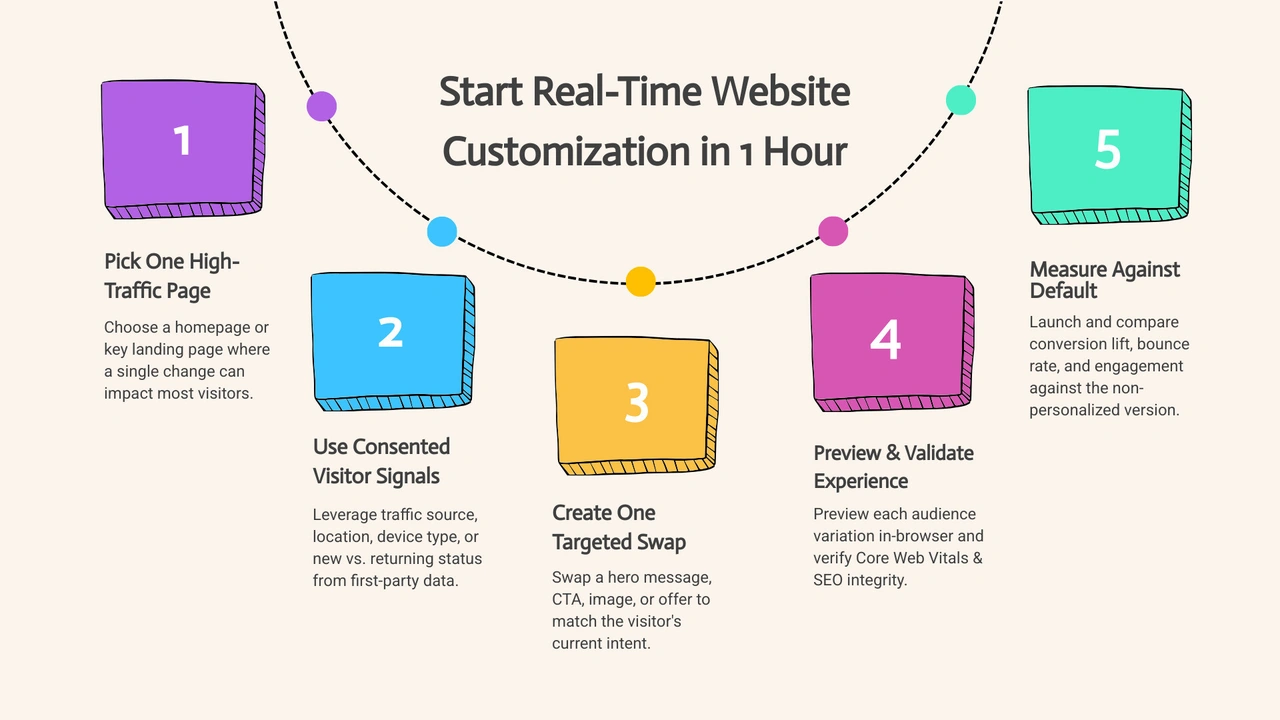
You can start real-time website customization in less than an hour by focusing on one page and one visitor signal at a time:
The goal is simple: show a visitor content that better matches why they came to your site right now. With 71% of consumers expecting personalized online experiences, even a small change to a headline or CTA can make a visit feel more useful and less generic.
I’m Ben Visser, founder of Social Design House, a Charlotte-based 10-person creative studio that has worked as a fractional creative team for 16 years. Our work across brand strategy, Webflow and WordPress development, content, performance marketing, and our AI Brand Framework helps growing brands find their sweet spot with real-time website customization that supports clearer journeys and stronger conversions.
Know your real-time website customization terms:
Dynamic web adaptation brings together visitor intent, unified data layers, and fast edge delivery. When a visitor lands on a page, the browser evaluates contextual signals within milliseconds. These signals trigger specific visual blocks and copy variants without forcing a full page reload or introducing noticeable layout shift.
Modern systems rely on lightweight behavioral triggers. These triggers track scroll depth, referral parameters, geolocation, and past visit frequency. Machine learning models score these interactions on the fly. Instead of showing the exact same static layout to every user, the page swaps out headlines, featured case studies, and call-to-action buttons based on verified intent.
Static personalization groups people into broad, slow-moving buckets based on historical data collected days or weeks prior. It often breaks down because visitor needs change between visits. A prospect researching enterprise pricing today needs different information than when they casually browsed your blog last month.
Real-time website customization focuses on immediate context. It analyzes live clickstream data, search intent, and campaign parameters as the session happens. When a visitor arrives from a targeted campaign, the page adjusts its proof points, product imagery, and copy immediately.
Our team approaches this through intentional Digital User Experience Strategy. Clarity is a gift, and presenting the most relevant information right away keeps visitors engaged. Personalizing CTAs can make websites perform 202% better than generic CTAs, making real-time adjustments a powerful driver of conversion acceleration.
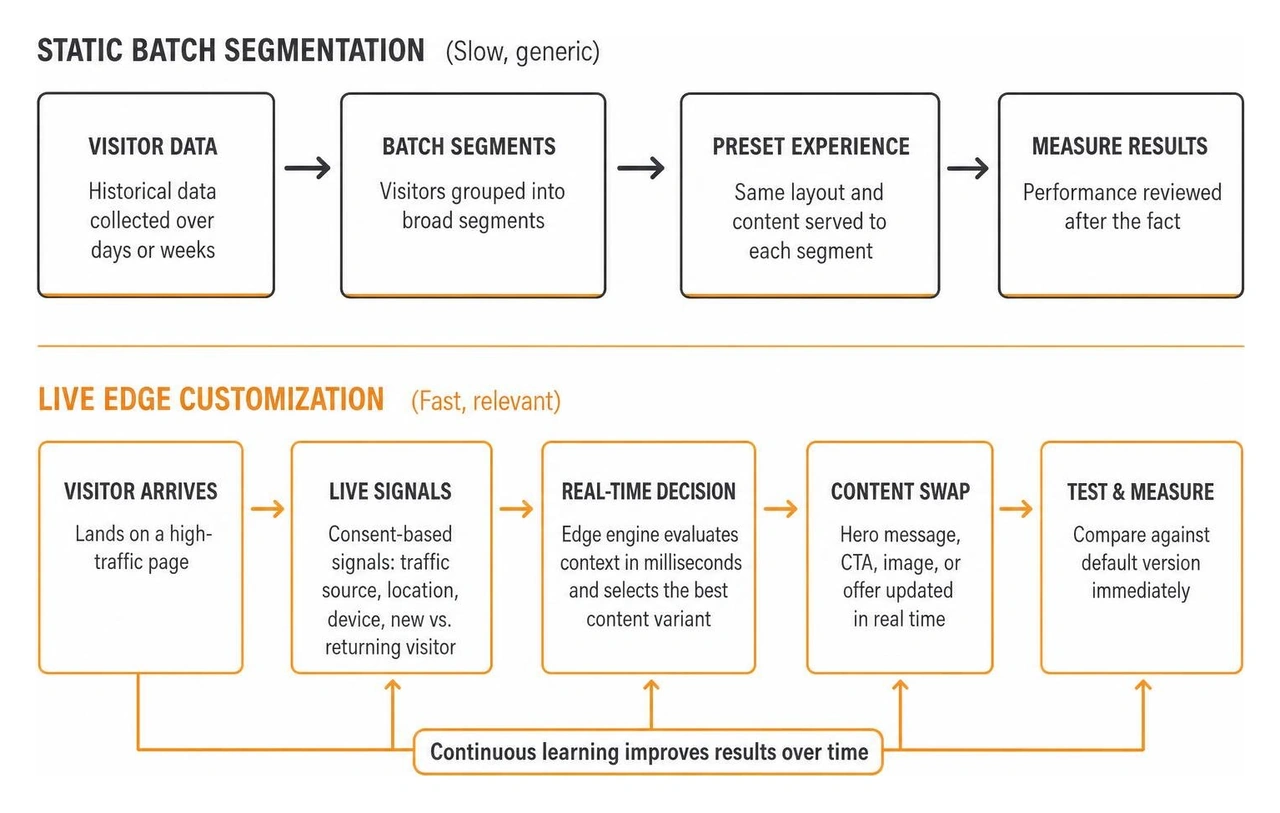
Modern dynamic delivery uses three primary technical components: Customer Data Platforms (CDPs), context graphs, and real-time AI decision engines.
Recent developments show how web architectures are advancing. Platforms like Turn every URL into an intelligent agent: Fibr AI’s ‘Agentic Web Experience Platform’ is smart illustrate how URLs can act as adaptive systems responding to visitor intent. For engineering teams seeking granular component control, developer toolkits like ZohaibAhmed/onclaw showcase how typed context boundaries and prompt-driven components generate tailored user interfaces securely.
| Feature | Static Personalization | Real-Time Customization |
|---|---|---|
| Data Processing | Batch updates run overnight or weekly | Millisecond edge evaluation during the session |
| Primary Trigger | Historical list membership | Live intent, referral source, active session actions |
| Content Delivery | Hardcoded page variants | Dynamic component and asset swaps |
| Setup Overhead | Complex developer maintenance | Visual rule-builders and AI-driven logic |
| Adaptability | Low responsiveness to real-time intent | High responsiveness to active session signals |
Implementing live customization does not require a complete website rebuild. By breaking the process into four focused stages, you can launch your first real-time content swap in under an hour.
Start by identifying the visitor signals that provide the clearest intent indicators:
Target your primary hero section first. As the first touchpoint above the fold, hero messaging sets the tone for the entire session. By pairing these signals with structured Marketing Automation, you can align paid ad messaging directly with on-page headlines.

Once intent signals are defined, set up your content variants. A great visual rule-builder allows marketing teams to adjust copy, featured products, and button text without touching underlying template code.
When we evaluate modern platforms in our What is Webflow and how is it different from WordPress guide, we highlight the value of modular visual systems that support rapid content adjustments. Our work in Website Design & Development Charlotte focuses on clean component structures that make dynamic swaps straightforward to deploy and maintain.
Focus on three high-impact swaps:
Connect your dynamic components to your existing customer data layer. When a known lead visits your site, the page should reflect their relationship with your brand.
We regularly help clients solve technical handoffs when answering Can you build automation that connects our website to our CRM. Linking these systems allows your site to replace generic discovery content with customer-specific resources, direct contact links for assigned account reps, or specialized onboarding steps.
Before pushing changes live, test your variations across simulated user segments. Ensure that dynamic rendering does not create content layout shift or delay page paint times.
Search engines must always see a crawlable, fully functional default page state. In our SEO, AEO, GEO framework, we ensure that dynamic content modifications enhance usability without triggering cloaking penalties or fragmenting page indexation. Verify that standard meta tags, structured schema, and base canonical URLs remain consistent across all personalized views.
After launching your initial hero test, you can scale dynamic experiences across complete conversion funnels and different industry models.
Different industries benefit from distinct dynamic touchpoints:
Tracking performance accurately requires looking beyond aggregate traffic numbers. We evaluate engagement depth, conversion lift, and downstream sales velocity.
In our strategic reviews addressing How do analytics factor into your UX work and How do we measure success, we compare personalized segments against unpersonalized control groups. Businesses using customer data outperform competitors by 85% in sales growth and 25% in gross margin, while standard website personalization routinely drives a 10-15% revenue lift.
Traditional A/B testing evaluates two static variations against each other across an entire audience to find a single winner. Real-time customization dynamically serves different optimal experiences to multiple audience segments simultaneously based on continuous behavioral signals.
Properly built dynamic components load asynchronously at the edge or render server-side, protecting DOM stability and Largest Contentful Paint (LCP) scores. Search engine bots crawl the default baseline HTML, preserving search indexing without triggering cloaking penalties.
You can start effectively using privacy-safe contextual signals that require no invasive tracking. URL UTM parameters, referral domains, screen resolutions, general geographic regions, and active session page sequences provide ample context to deliver relevant experiences while staying fully compliant with privacy regulations.
Setting up real-time customization creates an inviting, highly responsive digital presence. When you match visitor intent with relevant messaging right as they arrive, every page works harder for your business.
Simple, not easy. Starting with one focused page and one clear visitor segment helps your team see tangible results quickly without unnecessary technical hurdles.
If you are looking to refine your web presence and connect more effectively with high-value tenants, investors, and clients, explore our specialized approach to commercial real estate website marketing in Charlotte. We are excited to continue helping ambitious teams build clearer, higher-performing digital platforms.