There are a lot of ways to build a website in 2026. WordPress, Squarespace, Framer, AI-generated app builders, a cousin who "knows HTML." The options have never been wider, which means the decision has never been more confusing.
.svg)


We've watched the Webflow platform grow from a scrappy visual builder into one of the most capable website experience platforms on the market, and we've pressure-tested it across industries, content structures, and integrations that would make most template-based builders buckle.
So when clients across the Carolinas ask us whether Webflow is the right move, we don't give them a sales pitch. We give them an informed opinion backed by years of production work.
Here's ours.
Webflow is a visual development platform that lets designers and developers build custom, responsive websites without writing code from scratch. Under the hood, it generates clean, semantic HTML, CSS, and JavaScript, which means the sites it produces perform like hand-coded projects without the typical overhead of managing a custom codebase.
But calling Webflow a "website builder" undersells it. The platform combines a visual design canvas, a flexible content management system (CMS), built-in hosting on a global CDN, native e-commerce capabilities, and a growing suite of AI-powered tools for SEO, AEO, and content optimization. It's less of a page builder and more of a full website experience platform.
For brands and businesses that need design precision, content flexibility, and performance out of the box, Webflow occupies a category that most competitors only partially cover.
We're not a Webflow shop because it was trendy. We became one because it consistently solved problems that other platforms couldn't, at least not without a tangle of plugins, workarounds, or developer dependencies.
Design without compromise. Webflow gives our team pixel-level control over every element on the page. Animations, interactions, responsive breakpoints, typography, spacing. Everything a designer envisions can be built natively, without handing a mockup to a developer and hoping it comes back intact.
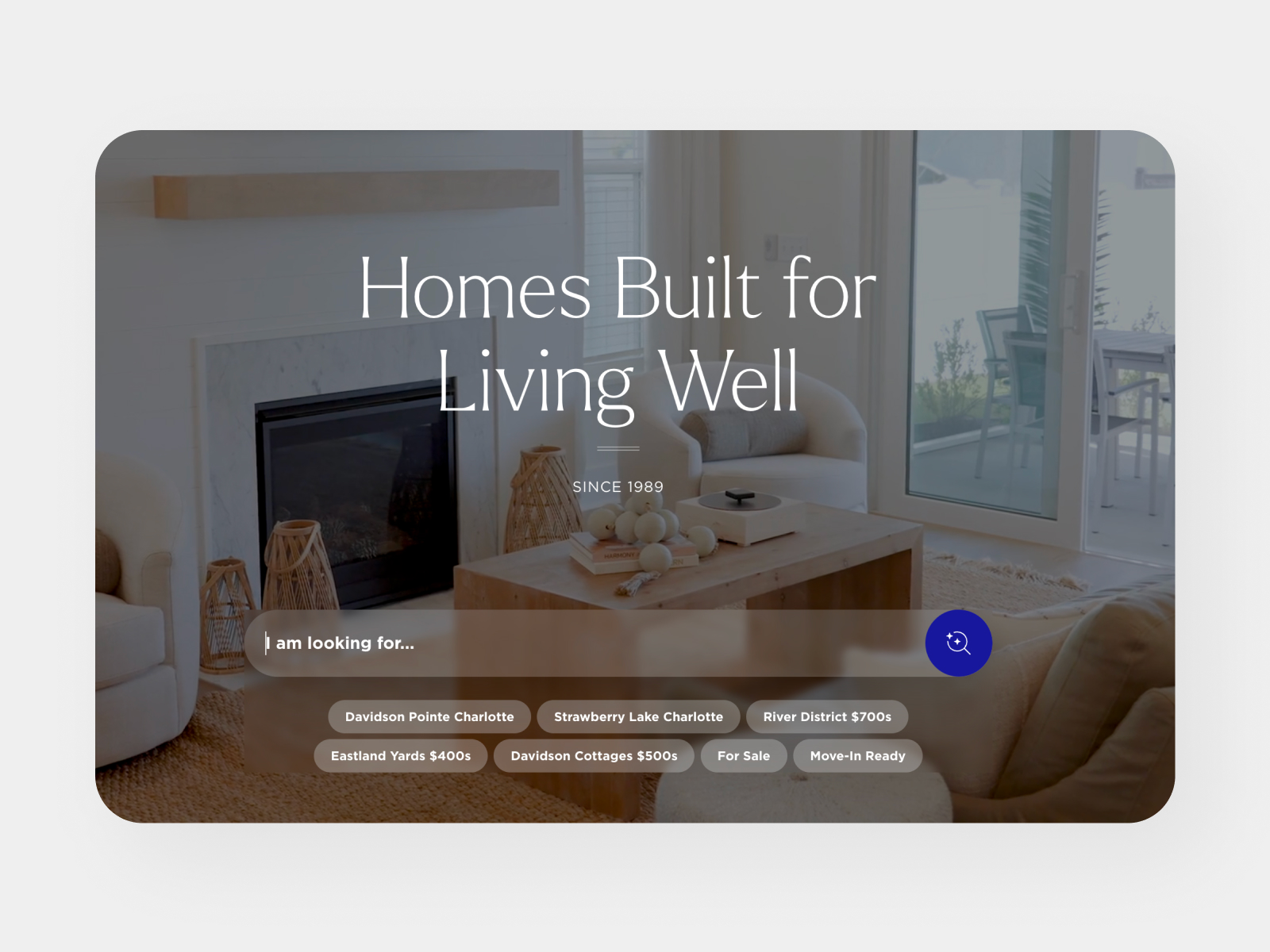
A CMS that marketing teams can actually use. One of our standout projects is MyNiche Apartments, a site that balances strong brand personality with a robust, layered content ecosystem of cities, neighborhoods, apartments, and individual listings. Their team manages the site and its content entirely on their own, without help from our studio. The site has been online for three years, still running smoothly, with zero plugin updates or maintenance headaches. That's the kind of independence Webflow's CMS enables.
No plugin anxiety. If you've ever managed a WordPress site, you know the feeling: a plugin update breaks your layout, a security patch conflicts with another tool, and suddenly your Wednesday afternoon is gone. Webflow handles hosting, security, and performance natively. There's nothing to patch, nothing to update, nothing to monitor at 2am.
Integrations that go deep. We've connected Webflow sites to HubSpot, Salesforce, Yardi, RentCafe, Claude, and custom APIs. The platform's open architecture makes it straightforward to integrate with the CRM and property management tools our clients already rely on, without building middleware or hiring a back-end team.
This is where Webflow is pulling ahead in a way that matters. The platform now includes built-in tools for both Search Engine Optimization (SEO) and Answer Engine Optimization (AEO), the practice of structuring your content so AI systems like ChatGPT, Gemini, and Perplexity can accurately understand and cite your brand.
Webflow's AI tools can audit your entire site for missing alt text, meta titles, meta descriptions, and schema markup, then generate fixes automatically. Every Webflow site produces clean, semantic code and supports llms.txt files, making your content machine-readable from day one.
With AI-driven search becoming the primary way many customers discover brands, AEO readiness is no longer optional. Webflow is one of the few platforms building these tools directly into the core product rather than relying on third-party plugins.
Webflow's native interaction engine already offered scroll-based, hover, and click-triggered animations. The 2025 Conf introduced GSAP integration, giving designers more granular control over timing, easing, and sequencing. The system also respects user accessibility preferences like "reduce motion," which is a thoughtful touch that many animation-heavy platforms overlook.
Webflow now supports AI-generated site creation from a prompt, producing multi-page sites with structure, styles, and animations that you can continue building in the visual canvas. The platform's App Gen feature goes further, generating production-grade web applications (pricing calculators, job boards, dashboards) that inherit your site's design system, connect to your CMS, and deploy with a single click.
Multiple team members can now work on the same project simultaneously, with comment-only links for stakeholders who don't need a Webflow account. For agencies and marketing teams coordinating reviews, this cuts days off the feedback cycle.
Every platform has a place. Here's where each one fits, and where it doesn't.
WordPress powers a massive share of the internet, and for good reason. Its plugin ecosystem is enormous, its developer community is vast, and for highly specialized functionality (complex user roles, advanced membership systems, niche integrations), it can do things no other platform matches.
The trade-off is maintenance. WordPress sites require regular plugin updates, security monitoring, hosting management, and periodic performance tuning. A WordPress site is a living system that needs ongoing technical attention. Webflow handles all of that natively. Your team focuses on content and design, not server upkeep.
If your project requires a massive plugin library or very specific back-end functionality, WordPress may be the right tool. For most marketing websites, brand sites, and content-driven projects, Webflow delivers more capability with less overhead.
Squarespace is a solid option for individuals, freelancers, and small businesses who want a polished site up quickly with minimal effort. Its templates are attractive, its editor is intuitive, and its all-in-one pricing includes hosting, domains, and basic e-commerce.
Where Squarespace struggles is flexibility. Custom layouts, advanced animations, third-party integrations, and complex content structures all hit walls quickly. Many of our clients started on Squarespace and migrated to Webflow when their needs outgrew the template structure. If you need a simple portfolio or small brochure site and don't anticipate complexity, Squarespace will serve you well. For anything with growth ambitions, Webflow offers considerably more room.
Framer has earned a loyal following among designers and startups, and rightfully so. It's fast, visually polished, and its micro-interactions are impressive out of the box. For a single-page landing site or a startup marketing page, Framer can produce stunning results quickly.
The gap shows up in content management and scale. Framer's CMS is less mature, its SEO tooling is more manual, and its integration ecosystem is smaller. For structured blogs with high traffic, multi-collection content architectures, or e-commerce, Webflow is the stronger long-term bet. If your project is a design-forward promotional page that connects to an external back end, Framer is a capable choice. If your site needs to grow alongside your business, Webflow provides a more complete foundation.
Lovable is a different animal altogether. It's an AI-powered full-stack app builder where you describe what you want in plain language and the platform generates the codebase, front end and back end included.
It's impressive for rapid prototyping and MVPs. Founders validating an idea can go from concept to clickable product in hours. But Lovable is a starting point, not a destination. Users frequently report unpredictable costs from credit-based pricing, AI-generated bugs that consume more credits to fix, and a general lack of production-readiness for complex projects. Many Lovable users end up exporting their code to GitHub and rebuilding in a more robust environment.
If you need a working prototype fast, Lovable can get you there. If you need a website that represents your brand, serves content reliably, ranks in search, and integrates with your business tools, Webflow is operating in a fundamentally different category.
We'd be doing you a disservice if we didn't mention where Webflow has room to grow.
Enterprise pricing for granular user access. If you need fine-grained control over who can edit what, Webflow requires an Enterprise plan. Enterprise is full-featured, but it's a significant investment. For teams that need role-based permissions beyond the standard editor/designer tiers, this is worth factoring into your budget.
Learning curve for non-designers. Webflow's visual canvas exposes CSS logic, box models, and responsive breakpoints. For a marketing manager updating blog posts, the CMS editor is straightforward. For someone trying to build new page layouts without design experience, the learning curve is real. That's exactly why working with a certified studio matters.
E-commerce depth. Webflow's native e-commerce works well for most online stores, but if your business requires highly specialized product configurations, advanced inventory management, or marketplace functionality, a dedicated platform like Shopify may be a better primary tool (Webflow can still handle the marketing site).
We've built over 40 Webflow sites. Two of our full-time developers hold Webflow certifications. We've designed and shipped projects for brands across Charlotte, NC and the broader Carolinas region, from identity design and brand strategy through development and launch.
We're the go-to Webflow studio in the Carolinas because we pair platform expertise with creative strategy. A Webflow site without a clear brand point of view is just a well-coded empty room. Our process starts with understanding who you are, what you're trying to say, and who needs to hear it. The build comes after the thinking.
SDH helps brands find and visualize their true potential. We've defined a creative and inspiring team environment built on collaboration, kindness, and curiosity, and we leverage our uniquely collaborative process to help brands reach their maximum business and cultural potential.
Webflow is a visual development platform that combines design, CMS, hosting, and optimization tools in a single system. You build in a visual canvas that outputs clean, semantic HTML and CSS, then publish to managed hosting on a global CDN. WordPress is an open source CMS that relies on themes, plugins, and separately purchased hosting. The practical difference is maintenance. A Webflow site has no plugins to update, no security patches to chase, and no theme conflicts to debug. WordPress offers a far larger plugin ecosystem and more room for custom server side logic, but it requires ongoing technical management or a partner to handle it. For most marketing and brand sites, Webflow is the faster, lower maintenance choice. For complex membership systems, forums, or heavily custom database applications, WordPress or a headless setup may still be the better fit.

Yes. Webflow gives you full control over the technical fundamentals search engines evaluate: title tags, meta descriptions, canonical tags, alt text, 301 redirects, and Open Graph settings, all editable per page and per CMS item. Every site auto generates an XML sitemap, supports schema markup, and includes robots.txt, llms.txt, and crawler access controls. The generated code is clean and semantic rather than plugin bloated, and Webflow hosting runs on a global CDN, which helps page speed and Core Web Vitals. Webflow also ships AI powered SEO and AEO auditing that flags on page and technical issues across the whole site. One honest caveat: no platform ranks you on its own. Webflow removes the technical obstacles. Content quality, site architecture, and authority still do the actual work.
Answer Engine Optimization (AEO) is the practice of structuring your website so AI systems like ChatGPT, Google AI Overviews, Perplexity, and Claude can accurately understand, summarize, and cite your business. Traditional SEO optimizes for a ranked list of links. AEO optimizes for being the source an AI quotes when someone asks a question. It matters because buyer research increasingly starts inside an AI tool rather than on a search results page. If those systems cannot parse your content, or cite a competitor instead, you are out of the consideration set before a click ever happens. In practice, AEO means clear question and answer content, accurate structured data, an llms.txt file, deliberate crawler permissions, and factual claims a model can verify. Webflow now builds AEO tooling into the platform, including agents that audit content and technical readability, plus reporting on LLM visibility and AI agent traffic.
Yes. Webflow connects to major CRMs including HubSpot and Salesforce, and to industry platforms like Yardi and RentCafe for property management. Form submissions can pass directly into your CRM with hidden fields, UTM parameters, and source data intact, so attribution survives the handoff. Beyond native connections, Webflow provides a REST content management API, read only content delivery APIs, and webhooks that fire on form submissions and CMS changes. That covers most custom integration needs, whether you are syncing a listings database, pushing leads into a proprietary system, or triggering a HubSpot workflow. At Social Design House we build these connections as part of the site rather than as an afterthought, so your website behaves like a real part of your sales stack instead of a brochure that happens to have a contact form.
For most small to mid sized stores, yes. Webflow Ecommerce handles product management, variants, a fully custom shopping cart and checkout, Stripe and PayPal payments, Apple Pay, automatic tax calculation, and custom shipping rules. The design control is the real advantage: you style the cart and checkout the same way you style the rest of the site, which is not true on most platforms. Ecommerce plans stack on top of a site plan. As of August 2026, Standard is $29 per month billed yearly with 500 ecommerce items and a 2% transaction fee, Plus is $74 with 5,000 items and no transaction fee, and Advanced is $212 with 15,000 items. If you have complex inventory, multi warehouse fulfillment, subscriptions, or marketplace requirements, Shopify is usually the better engine. Webflow can still power the brand and marketing site in front of it.
Webflow restructured its pricing in May 2026. As of August 2026, Site plans are: Starter, free, limited to a webflow.io subdomain. Basic at $15 per month billed yearly for static sites with no CMS. Premium at $25 per month billed yearly, which replaced the old CMS and Business plans and includes 20,000 CMS items, 40 Collections, and 300 static pages. Above those sit Team at $2,500 per month on an annual contract and Enterprise at custom pricing. Two things people miss. Site plans are per site and separate from Workspace plans, which cover your team: full seats are $39 per month, limited seats $15, and reviewer seats are free. Ecommerce and add ons like Optimize, Analyze, and Localize stack on top. A realistic all in budget for a small business marketing site is $25 to $75 per month. Compared to WordPress, where hosting, security, premium plugins, and maintenance labor accumulate, Webflow's pricing is often lower across a three year window.
It depends what you mean by use. Webflow separates building from editing, and the two require very different skill levels. Building new pages, layouts, and design systems benefits from someone with real design and front end experience. Webflow exposes the full CSS box model, so it rewards people who understand how the web actually works and frustrates people expecting a drag and drop template builder. Managing content is a different story. Adding blog posts, updating CMS items, swapping images, editing copy, and adjusting calls to action are all things a marketing coordinator can handle after a short walkthrough. That independence is one of the strongest arguments for the platform: your team stops filing tickets to change a headline. We typically build a component library at launch so your team can assemble new pages from approved blocks without touching the underlying design system.
Yes, within published limits that sit well above what most teams need. The Premium Site plan supports 20,000 CMS items, 40 CMS Collections, and 300 static pages. The Team plan raises that to 100 Collections and 500 static pages, and Enterprise limits are custom. Collections support reference and multi reference fields, so you can model genuinely relational content rather than flat lists. For scale beyond the site itself, Webflow's content delivery APIs let you serve the same CMS content to apps, kiosks, or other channels, and Webflow Cloud can host custom application logic alongside the marketing site. The more common constraint is architecture, not platform ceilings. Complex sites fail when content modeling is rushed, not when item counts run out. Projects like MyNiche Apartments have run layered content structures on Webflow for years without ongoing studio intervention.
Because the platform is the easy part. A studio brings brand strategy, information architecture, conversion thinking, and production tested workflows that a tool cannot supply on its own. We have seen what works across 40 plus builds, and that pattern library translates into faster timelines, fewer rebuilds, and sites that perform on day one rather than after six months of guessing. The specific things teams underestimate: naming and structuring a design system so it stays maintainable, modeling CMS Collections before the content exists, handling redirects and technical SEO during migration, and building the integrations that connect the site to sales. To be fair, if you need a two page landing site and someone on your team is comfortable in the Designer, build it yourself. Hire a studio when the site has to carry real revenue weight. AI can generate a website. It cannot generate a brand strategy.
Social Design House is a branding, web design, and digital marketing agency located at 1213 W. Morehead Street, 5th Floor, Charlotte, NC 28208, in Charlotte's West End near Uptown. You can reach us at (866) 264-0643, Monday through Friday, 9:00 AM to 5:00 PM Eastern. We work with clients across the Charlotte metro, throughout the Carolinas including Raleigh, Charleston, Greenville, and Columbia, and nationally for clients who prefer a remote engagement. Our team is in house rather than outsourced, which means design, development, strategy, and content sit under one roof and one timeline. Core services include brand strategy and identity design, Webflow website design and development, UX strategy, SEO and AEO, and marketing automation. We work most often with real estate and commercial real estate, home services, nonprofits and arts organizations, financial services, and B2B companies.